


Toca Boca Hair Salon 4
3.87.21K Reviews
App Specs
- Version
- 3.1
- Updated On
- License
- Free
- Downloads
- 50,000,000+
- Developer
- Play Piknik
- Categories
- Educational
- Platform
- Android, iOS
Screenshots
 Analysis by AppCompare
I like creative games best when they let me settle into a small, satisfying routine rather than pushing me toward a score or a timer. That is the appeal of Toca Boca Hair Salon 4: I can pick a character, try out a look, and keep changing it until it feels right. It is an educational game from Play Piknik, but its value is less about formal lessons and more about exploring choices, expressing an idea, and seeing how one change affects the whole style.
The game is free to start and rated for Everyone, which makes it an easy option to consider for a child who enjoys pretend play or for an adult who wants a relaxed creative break. It has an average rating of 3.7 from around 165,000 ratings, alongside roughly 7,000 written reviews, and has passed 50 million installs. Those numbers suggest a widely tried game, though they do not mean every player will enjoy its pace or its purchase model. The current version is 3.1, and it runs on Android 7.0 or later.
Getting Started with Your New Salon
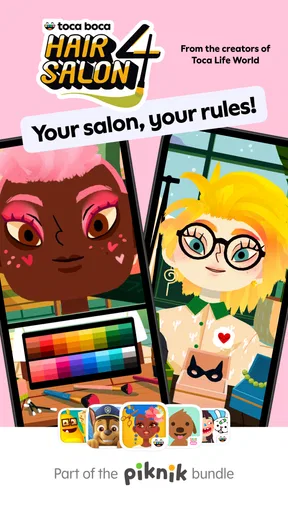
First things first, downloading Toca Boca Hair Salon 4 was a breeze. Once I had it installed, I was eager to dive right in. The app welcomes you with a vibrant and colorful interface that screams creativity. It's like stepping into a whimsical salon where anything is possible. The intuitive design makes it super easy to get started, even if you’re not familiar with the previous versions.
Unleash Your Inner Stylist
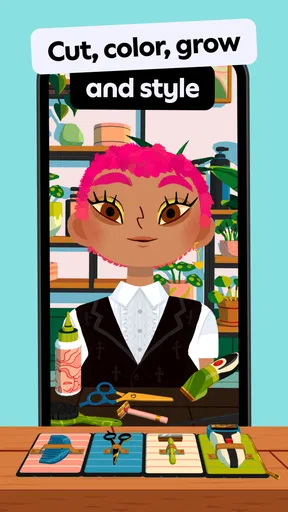
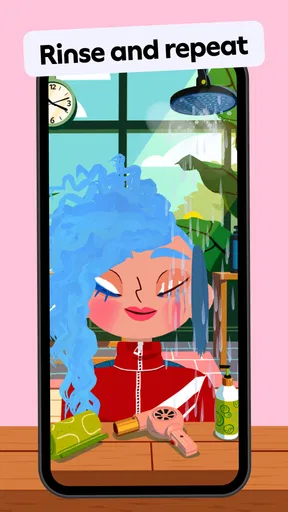
The main attraction here is the styling itself. You’ve got a diverse cast of characters ready for a makeover. I loved how each character had their own quirky personality, making each styling session feel unique and engaging. The tools available are extensive, from scissors and razors to colorful dyes and styling gels. It’s a blast experimenting with different looks, and trust me, the sky's the limit.
For a first session, I would resist trying to make a perfect style straight away. I get more out of choosing one idea—such as a bold color or a dramatic cut—and seeing how the tools change the character’s look. Then I can adjust the rest to suit it. That simple order keeps the play focused without turning it into a checklist, and it gives younger players an easy way to make decisions one at a time.
A useful habit is to treat each makeover as a before-and-after experiment. I might begin with a rough plan, make one noticeable change, and pause to see whether the result still fits the character I have in mind. If it does not, I can try another direction instead of layering on more changes just because the tools are there. The freedom is the point, but a small plan makes it easier to understand what I like about a finished look.
Taking Photos and Making a Repeatable Routine
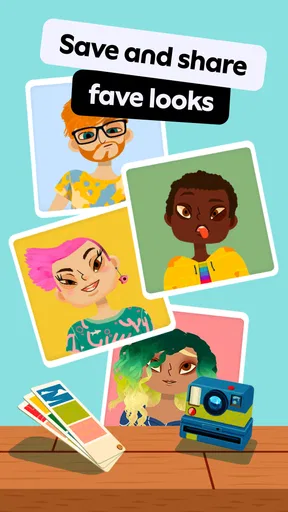
One of my favorite features is the photo booth setup. After crafting a masterpiece, you can take snapshots of your work. It’s a fun way to show off your creative flair and share it with friends. Plus, it’s always satisfying to see your character flaunt their new ‘do with confidence.
Worth Reading Before You Choose

Flipboard Shows What News Apps Must Do Beyond the Feed

Switching to Android Auto Means Rethinking Your Driving Routine

Google Calendar Makes a Crowded Week Easier to Manage

Ludo King Makes the Most of the Minutes Between Plans

Baby Panda World Brings Quick Play to Modern Phones, but Its Game Library Feels Busy

ESPN’s Live Game View Makes Following Close Games Easier
The photo booth also gives a session a natural stopping point. I can finish a style, take a snapshot, and move on instead of endlessly fiddling with tiny details. For a child playing alongside a parent or sibling, that creates an easy turn-taking rhythm: one person chooses the overall idea, another suggests an accessory or outfit, and then the finished result gets its moment in the booth. It is a practical way to make the game social without needing to turn the activity into a competition.
If you want to build a set of looks, I would vary one major choice at a time. For example, keep a similar outfit while trying a different hairstyle, then switch the clothing while keeping the hair direction. That makes the contrast easier to notice and gives each new attempt a purpose. It is a player-made workflow rather than a special mode, but it helps the creative options feel less overwhelming, especially for someone who is just learning what the tools can do.
A World of Customization
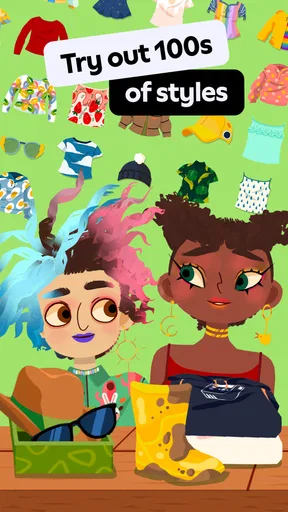
This app doesn’t just stop at hairstyles. I was thrilled to find various customization options for outfits and accessories. Mixing and matching different styles kept me entertained for hours. The continuous updates are a huge plus, ensuring that there’s always something new to explore.
That range is also why I would not treat every makeover as a race to use everything. Hair, clothing, and accessories can each pull attention in a different direction. When a look starts to feel crowded, removing one element can be more effective than adding another. I find it useful to decide whether the hair or the outfit should be the main focus, then use the other choices to support it. This small bit of restraint makes the final character feel more intentional.
The game is a good fit for a short break at home, a quiet activity while waiting, or a shared creative session when a child wants to show an adult what they have made. It does not require a player to know anything about hairstyling, and there is no need to arrive with a finished design in mind. The open-ended approach suits children who like imaginative play and adults who enjoy experimenting with visual combinations. It is less suitable for someone looking for a structured learning course, a salon-management challenge, or a game with clear objectives and measurable progress.
Compared with drawing apps, the salon format gives the player a ready-made character and a set of styling tools, so it is easier to begin without a blank canvas. Compared with dress-up games focused mainly on clothing, the hair work is a more central part of the creative process, while outfits and accessories let the player complete the look. That makes it a handy middle ground for casual makeovers. On the other hand, anyone who wants freehand drawing, detailed control over every visual element, or a goal-driven game may prefer a different kind of creative app.
There is a real trade-off between variety and simplicity. Having many ways to change a character encourages experimentation, but a younger player may need a little time to work out which choices they want to make first. I would offer a gentle prompt—“What should stand out most?”—rather than taking over the design. That keeps the child in charge while giving the session a starting point. For solo play, saving the photo at the end can provide a clear sense of completion even when the game itself does not impose a finish line.
Before handing the device to a child, I would also check the purchase settings on the device. The game is free, with in-app purchases ranging from $0.99 to $79.99 per item, so it is worth making sure purchases are managed in a way that suits your household. That is a more useful precaution than assuming “free” means there can never be a payment prompt. The Everyone age rating makes it broadly accessible, but family preferences around spending still matter.
There are limits to how long the core activity may hold someone’s attention. Players who enjoy trying looks will find reasons to return, but anyone who needs new objectives, puzzles, or a story to carry them forward may run out of motivation sooner. The salon is best understood as a creative toy, not a deep progression game. Likewise, while I enjoy making and photographing a finished look, I would not choose it as a substitute for a full-featured photo editor or a drawing tool; its appeal comes from styling the characters within the game’s own playful setup.
For a realistic everyday use, imagine a child winding down after school while dinner is being prepared. They can choose a character, make one hairstyle decision, coordinate an outfit, and take a final photo before putting the device away. The activity is easy to pick up and pause, and an adult can join in briefly without needing to learn complicated controls. If the child instead wants a long game with levels or a clear reward structure, this probably is not the best choice for that moment.
What to Expect Before You Settle In
The game’s free entry lowers the barrier to trying it, but the in-app purchase range means I would not leave spending expectations unspoken if a child is playing. The available choices also do not guarantee that every player will find endless novelty: much of the enjoyment comes from inventing new combinations with the styling and customization options already at hand. That is a strength for an imaginative player and a limitation for someone who prefers the game to supply a fresh task each time.
It is also worth thinking about the difference between a quick makeover and a longer creative session. A quick player can make one change and take a photo; someone with more patience can experiment with hair, outfits, and accessories until the parts work together. Neither approach is more correct. I would start with a short session and see whether the player naturally wants to keep exploring, rather than expecting the game to occupy a fixed amount of time.
For caregivers wondering whether the game is approachable, its colorful interface and straightforward styling premise make it easy to introduce, and the Everyone rating signals broad age suitability. For players asking whether it is educational, I see its learning value in open-ended decisions and visual experimentation, not in lessons or quizzes. And for anyone wondering whether they need to know earlier entries, the game is accessible to newcomers; familiarity with previous versions is not necessary to begin making styles.
Creativity, Inclusion, and the Best Way to Play
What really sets this app apart is its commitment to inclusivity. The diversity in character options and the ability to create a range of styles that cater to different tastes is something I truly appreciated. It’s refreshing to see an app that embraces creativity in such a broad spectrum.
That inclusivity matters most when the player is allowed to define what looks good, rather than being nudged toward one “correct” makeover. I would use the characters and styling choices as an invitation to try ideas without judging them as realistic or fashionable. A deliberately unusual combination can be as satisfying as a polished one, and the game’s playful tone makes room for both. For families, that can turn a simple styling session into a low-pressure conversation about personal taste and self-expression.
My main practical tip is to give each session a loose theme, not a strict target. A player might aim for a bright, dramatic look, a coordinated outfit, or a hairstyle that feels completely different from the previous attempt. Then the photo booth becomes a way to mark that idea, rather than just an extra step at the end. This creates variety from the tools already in play and helps a returning player avoid repeating the same choices by default.
As with any open-ended creative game, the best experience depends on the player’s temperament. A child who loves choosing colors, revising a design, and showing the result can settle into it happily. Someone who gets frustrated by having to invent their own goal may need an adult to suggest a small theme—or may simply be happier with a puzzle game that tells them what to do. I would not call that a flaw so much as a clear difference in what the game asks from its audience.
Final Thoughts
All in all, Toca Boca Hair Salon 4 is a fantastic way to let your creativity shine. Whether you’re a kid or just young at heart, this app is bound to keep you entertained. It’s like having a mini salon right in your pocket. So, if you’re ready to unleash your inner stylist, this app is definitely worth a download. Happy styling!
My recommendation is strongest for families looking for relaxed, imaginative play and for anyone who likes making visual choices without being judged on a score. I would skip it if I wanted a detailed tutorial, competitive goals, or a constantly guided sequence of challenges. For the right player, though, its best moments come from a simple cycle: choose a character, try an idea, adjust the details, and capture the result. That is a modest formula, but it gives the game a pleasant, repeatable place in a child’s creative downtime.
Pros
- Engaging and creative gameplay.
- Wide range of hair styling tools.
- Inclusive character choices.
- No in-app purchases pressure.
- Colorful and appealing graphics.
Cons
- Limited free content options.
- Occasional lag on older devices.
- No multiplayer features.
- Some hairstyles feel repetitive.
- Requires internet for updates.
FAQs for Toca Boca Hair Salon 4
What is Toca Boca Hair Salon 4?
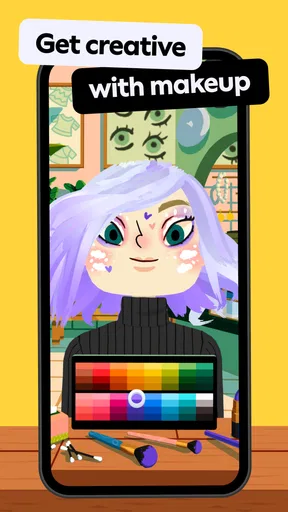
Toca Boca Hair Salon 4 is a creative children’s app available on Android and iOS platforms. It allows kids to explore their creativity by styling hair, applying makeup, and experimenting with various looks on a wide range of characters. The app emphasizes fun and imaginative play without any in-app purchases.
Is Toca Boca Hair Salon 4 safe for children?
Yes, Toca Boca Hair Salon 4 is designed specifically for children and is safe for users of all ages. The app does not contain any ads or in-app purchases, ensuring a distraction-free and secure environment. Toca Boca is known for creating apps that prioritize child safety and privacy.
Do I need internet access to play Toca Boca Hair Salon 4?
No, Toca Boca Hair Salon 4 can be played offline, making it convenient for kids to enjoy anywhere, anytime. An internet connection is only required for downloading the app and receiving updates. Once installed, all features are accessible without needing to be online.
What features does Toca Boca Hair Salon 4 offer?
Toca Boca Hair Salon 4 offers a variety of features, including hair cutting, coloring, and styling tools, as well as makeup options and accessories. The app lets kids experiment with different looks, encouraging creativity and self-expression. It also offers regular updates with new items and characters.
Is there a cost to download Toca Boca Hair Salon 4?
Toca Boca Hair Salon 4 is a paid app, which means there is an upfront cost to download it. However, the app does not include any additional in-app purchases or ads, providing a comprehensive and uninterrupted experience once purchased. The price can vary depending on the platform and region.


